People: employees and the details they give
The People module keeps who works for each company: their job and their first and last day, the private details they give themselves, the bank account their pay goes to and the files kept of them, and the org chart of who reports to whom. Find it under People → Employees; everyone reaches their own record under My details and the Org chart beside it. Pay itself is calculated elsewhere: People keeps what pay needs.
Who sees what
- Whoever keeps the people's records adds and changes employees and sees their private details: an administrator, or a role that opens the area People (the ready-made role HR manager does). See Roles.
- The person themselves sees their own record on My details, gives their own details and their bank account, and sees their files.
- Everyone else who opens People sees the list: names, jobs, managers, work percentage and dates, never private details.
- Everyone, whatever their role, sees the org chart: names, jobs, managers and departments.
Employee records are never copied into a test copy of the company.
Adding a starter
Employees → Add an employee (POST /v1/employees) asks only what nobody else knows: the
first and last name, the job title and the first day (today unless you pick another). The rest is
optional here:
- Contract: permanent, fixed term, paid by the hour, apprentice or intern.
- Work percentage: how much of a full-time week, 100 unless you give another.
- Manager: another employee of the same company.
- Last day: the end of a fixed term, or the day someone leaves.
- Work e-mail and Sign-in: the person's user; an administrator can also pick someone who
is invited and has not signed in yet. With a sign-in they see their record on
My details and give the rest themselves. A sign-in belongs to one employee of a company
(
employee_user_taken).
The number is the system's: E-00001, then the next. The status follows from the dates:
starting before the first day, active, leaving within 30 days of the last day, and
left after it. A record is never deleted: someone who leaves keeps their record with their
last day.
The details a person gives
On My details (PATCH /v1/employees/mine/{employee_id}), or on the person's page for whoever
keeps the records (PATCH /v1/employees/{employee_id}):
- Date of birth and nationality.
- Private e-mail and phone.
- The home address: type it and pick it from the suggestions, or type the postal code and the town is filled in.
- The social insurance number the company's country asks for: the AHV number in Switzerland
(13 digits starting with 756, written
756.1234.5678.97) or the Social Security number in the United States (123-45-6789). It is checked as it is saved (id_number_invalid). - Who to call in an emergency, and their phone.
What is still needed before the first pay (date of birth, home address, social insurance number and bank account; the list is in required details) is marked on the person's page, on My details and in the list's Still needed column.
The bank account for pay
Give a bank account (PUT /v1/employees/{employee_id}/bank, or
PUT /v1/employees/mine/{employee_id}/bank for one's own): the holder and an IBAN, or in the
United States a routing number, an account number and whether it is a checking or savings account.
A new account always waits for a second person in Approvals: never the AI reviewer, and
never the person who gave it or the employee themselves. Until it is confirmed the pay goes to the
account before. One new account waits at a time (employee_bank_waiting), and while it waits it
is no longer counted as still needed. The request is seen only by whoever keeps the people's
records and the person themselves: others do not find it in Approvals. Whoever keeps the records
sees the waiting account in full on the person's page, to check it with them, and is told when
another employee's pay already goes to the same account. Once confirmed, the account is shown with
its last four digits only.
Files
The person's page keeps their files: the contract, an ID or passport, a work permit,
certificates. Each is a PDF or a photo of at most 20 MB, with a kind, a title and, for a permit or
an ID, the day it expires; what expires within 60 days is marked. Whoever keeps the records adds
and removes files (POST and DELETE /v1/employees/{employee_id}/files); the person sees and
downloads their own.
First and last days
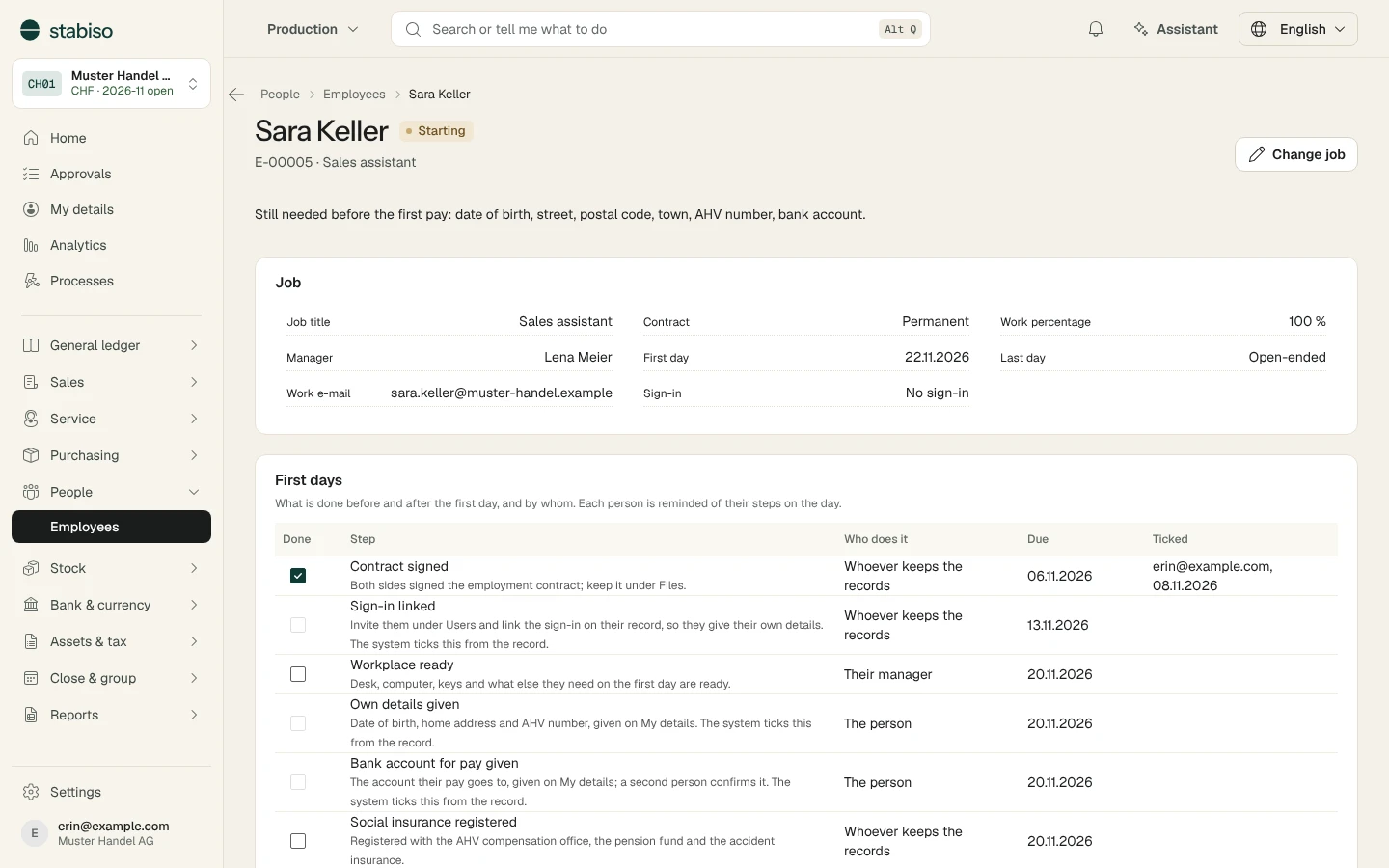
Each employee has a checklist of their first days and, once their last day is known, of their last days, on their page (First days, Last days). Each step says whose it is (whoever keeps the people's records, the person themselves, or their manager) and the day it is due, counted from the first or the last day:
| Step | Whose | Due |
|---|---|---|
| Contract signed | records | 14 days before the first day |
| Sign-in linked | records | 7 days before; ticked by the system once a sign-in is linked |
| Workplace ready | manager | the day before |
| Own details given | the person | the first day; ticked by the system once what pay needs is given |
| Bank account for pay given | the person | the first day; ticked by the system once it is given |
| Social insurance registered (Switzerland) | records | the first day |
| Registered with the health insurance fund (Germany) | records | the first day |
| Form W-4 handed in (United States) | the person | the first day |
| Form I-9 completed (United States) | records | 3 working days after the first day |
| Welcome talk | manager | the first day |
| Talk after the first month | manager | 30 days after |
| Leaving talk | manager | 5 days before the last day |
| Last pay worked out | records | 5 days before the last day |
| Reference letter handed over | records | the last day |
| Company things given back | manager | the last day |
| Sign-in set to end | records | the last day; ticked by the system once the sign-in is set to end after it |
A day that falls on a weekend is the Friday before. A step is never due before the day the
employee was added: a starter added after their first day has the steps that were due before
then due that day, not overdue. The country's own step follows its file
(employment.registration). A manager's step of someone without a manager is the records
keeper's. The system ticks its own steps from the record; the others are ticked by whose they are
(PUT /v1/employees/{employee_id}/steps/{step}, DELETE to open one again): the person ticks
their own, the manager theirs, whoever keeps the records any (step_not_yours, step_by_system).
The checklist is seen by whoever keeps the records, the person and their manager. A checklist
stays on the page until a month after its last step was due.
Steps waiting on you (GET /v1/employees/steps/waiting) lists the open steps that are yours,
soonest first: on Employees for the company, and on My details for a manager who does not
keep the people's records, where they tick the steps of their people. A starter sees Your first days on My details: a welcome with their
first day and manager, and their own steps.
Reminders: on the day a step is due, its person is told in their notifications (once for each employee and day), and once more when the day passed with it still open: a records step goes to whoever added the employee (every administrator when no person added them or they are gone), a manager's to the manager, the person's to the person, worded to them as their own. See notifications.
The sign-in ends by itself: when an administrator gives the last day of someone with a sign-in, their access ends at midnight after that day in the company's time (the step Sign-in set to end is then ticked, and Users shows when it ends); a last day that has already passed disables the sign-in at once. The message after saving says which. Taking the last day back takes that end back; an earlier end an administrator gave stays. A last day more than two years ahead, or one given by whoever keeps the records without being an administrator, leaves the step open for an administrator to give the last day.
The org chart
Org chart shows the organization twice:
- Companies and managers, the legal structure: each company and, in it, who reports to whom. An employee's manager works for the same company. Someone without a manager, or whose manager has left, is at the top of their company.
- Departments, the operational structure: departments across the companies, each possibly part of another, with its head, who may work for any of the companies. A team in Zurich and its colleagues in New York can be one department under one head. Someone's department head is whom they answer to in their work: the head of their department, or, for the head themselves, the head of the department above. Everyone in no department is listed last.
Beside each person the chart shows their job, the departments they head and, in the other view, whom they answer to there: the departments view names someone's company (when there are several) and their manager when it is not their department head, and the companies view names their department. Each manager, company and department shows how many people it has below it; whoever opens People also sees how many full-time posts they fill together (someone working 80 % counts 0.8), and who is leaving and when, as the list of employees shows them. Everyone else sees neither how much someone works nor that they are leaving, until they have left. Starters show the day they start. A department with no head, or whose head has left, says so: its people then answer to the head of the department above. Search finds a person, a job, a department or a company (Mueller finds Müller) and opens the way to it.
Whoever keeps the people's records keeps the departments on the chart: New department (its name, the department it is part of and its head, found by typing their name), and the pencil beside a department to change or remove it. A head who is in no department yet then works in the one they head. A name is used once in the organization. A department removed leaves nobody out: its people and the departments within it then belong to the department it was part of (or to none). Give someone their department in their employee form; their page then shows their department and department head. Nobody reports to themselves or to someone who reports to them, however far down, and no department is part of itself.
For assistants
The MCP tools list_employees, create_employee, update_employee and
give_employee_bank_account do what the screens do for whoever keeps the records;
my_employment, give_my_details and give_my_bank_account do it for the person themselves;
employee_steps and tick_employee_step work through the checklists for whoever they are for;
org_chart answers who reports to whom and who is in a department, and add_department and
change_department keep the departments. See the API: People,
My employment and Org chart.