Home as a conversation
Home can be a conversation instead of a list. Stabiso speaks first: it says what Autopilot settled since yesterday (or, while nothing is on Autopilot, offers to switch on the recommended outcomes) and how many things are left for you, and puts each of them under that line as a card you settle in place. Below the cards is your conversation with the assistant, with the message box and the talk button at the foot of the screen (on a phone just above the tabs), so you can ask or talk at once wherever you are on Home; each new line and answer is brought into view, a long answer from its first line. A chart the assistant shows can be pinned to the top of Home, so you build your own dashboard by asking.
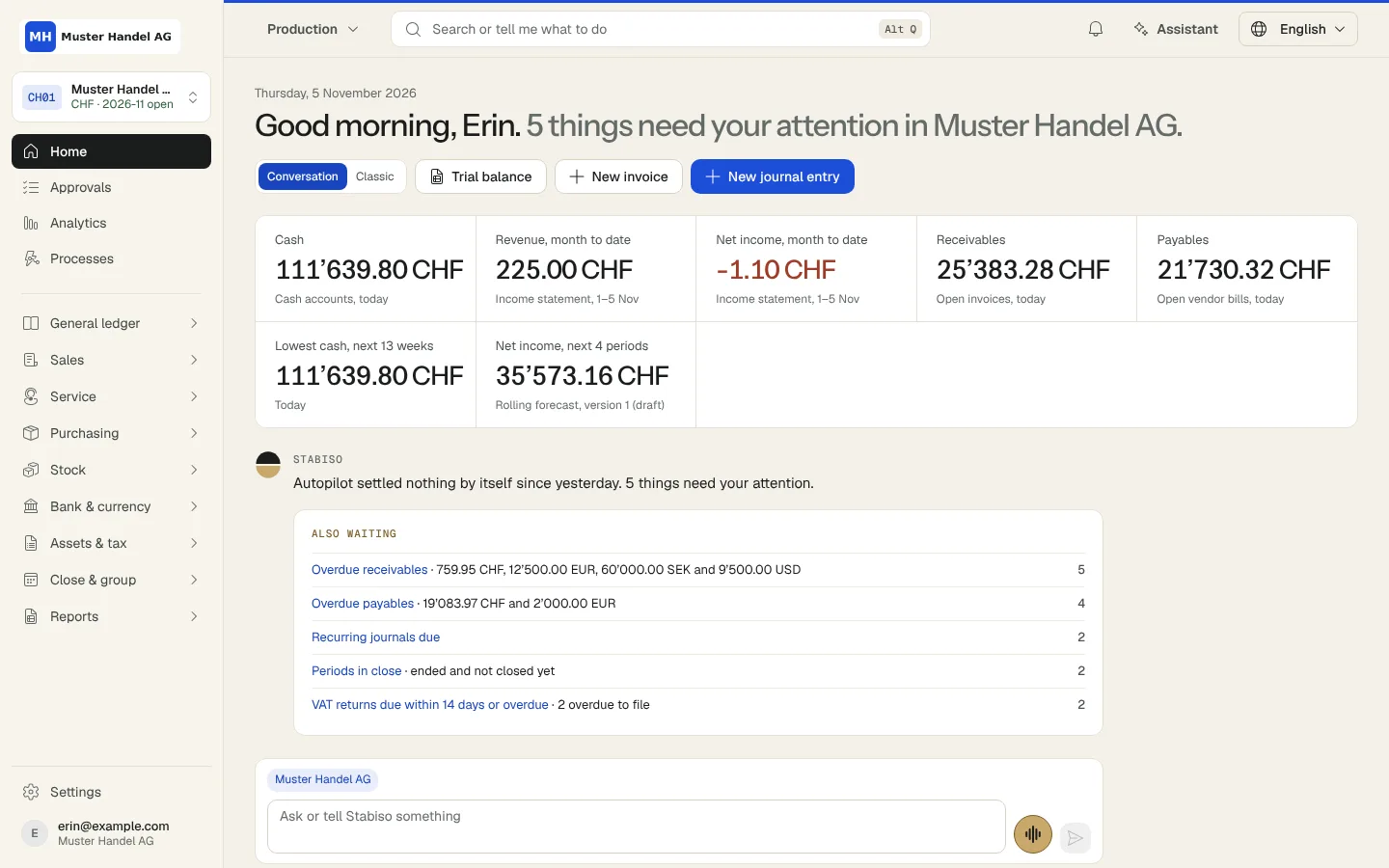
Where: Home, the Conversation switch at the top right (Classic brings back the list and the figures; the choice is kept in your browser). Over the API the pinned answers are the conversation API. The conversation is a feature module of its own (ADR-0115).
What Home opens with
- Get started: in a new company, its start list leads, above the figures, as on the classic Home (an administrator's), until every step is done or skipped (Get started).
- The opening line: what Autopilot's passes of the last day settled by themselves, by its rules and by the AI, and how many things are left for you. In a new company it also counts the steps left to set it up, and says nothing is left only when neither is. When its AI asked you something, a link opens the questions on Processes.
- Bank line no rule settled: the oldest unmatched bank line, with the open invoices or bills that pay it exactly (one, or two of the same customer or vendor together). Match records the payment as the bank screen does; the result says whether it waits for a second person's approval, and Undo takes the match back. When nothing pays it exactly, the closest documents are shown with Open in Bank.
- Approvals waiting for you: the requests you may decide (not your own), each opening its record, and Decide in Approvals.
- Also waiting: the rest of what Home's list counts (overdue invoices and bills, recurring invoices due, periods in close, VAT returns), each opening its list.
Asking and pinning
Type in the box or press the talk button: it is the same conversation as the assistant's panel on other pages, so what you asked there is here too. An answer can show a chart, a table, or the records it speaks of (each opens with a click), and when you ask to go somewhere the assistant opens that screen. The newest message scrolls into view; a long answer is shown from its first line. Start a new conversation clears it. Under each chart of an answer, Pin to Home keeps it at the top of Home with your question and the time it was pinned; the values are those of the answer then, so ask again for today's. The cross on a pinned answer takes it off Home. Home holds 12 pinned answers per company.
Rules
- The cards act as you: your rights, the approval policy and four eyes decide, exactly as on the bank and approvals screens. Approving, sending and paying stay a click of yours.
- Pinned answers are yours alone; nobody else sees them.
- Undoing a match needs the right to post, as on the bank screen.